Troubleshooting search issues: "Something went wrong" or no results
Last updated: March 24, 2026
If you're experiencing search issues like "Something went wrong" errors, searches getting stuck, or receiving zero results, here are the most common causes and solutions:
Common Error Messages and Quick Fixes
"Something went wrong - Can't find candidates at this moment"
This error typically occurs when:
Search criteria are too restrictive: Try making some criteria "optional" instead of "required"
Unrecognized industries or skills: Check that your industry names are standard (e.g., use "Technology" instead of niche terms like "Regenerative Nutrition")
Temporary system issues: Wait a few minutes and try refreshing the page. If you believe this to be a system error, let us know and we can attempt manually restarting your search.
Search stuck on "Preparing results" or "Analyzing criteria"
If your search appears frozen:
Refresh the page and try again
Make a small adjustment to your criteria (like changing years of experience from 5 to 6) to reset the search
If the issue persists, contact support
Getting Too Many Irrelevant Results
If your search returns candidates outside your preferred companies or locations:
Preferred criteria (including Preferred Companies) act as prioritization signals that rank candidates, but don't exclude anyone. They show "more or less of" those attributes rather than limiting strictly to them.
Required criteria create hard filters that exclude candidates who don't match.
Location and company filters use OR logic: If you add multiple values within a single filter (e.g., multiple locations or companies), candidates matching ANY one of them will appear. To create a hard limit, mark the filter as Required. For location, you can set a radius up to 50 miles.
To tighten your results:
Mark your most important location or company criteria as Required instead of preferred
Use the Inverse feature to exclude specific industries or companies you're seeing in results
Use "Ask Pin" to add exclusion instructions like "Exclude automotive industry and auto OEMs/suppliers"
Optimizing Your Search Criteria
Balance Required vs Optional Criteria
The most effective searches typically have:
2-3 required criteria (e.g., job title + location, or job title + specific skill)
Additional optional criteria to help rank candidates
Making too many criteria "required" can result in zero matches, while having too few required criteria may produce overly broad results.
Recommended Required Combinations
Job title + location
Job title + industry
Job title + key skill/tool
Location with specific radius (when geographic proximity is critical)
Use the Inverse Feature
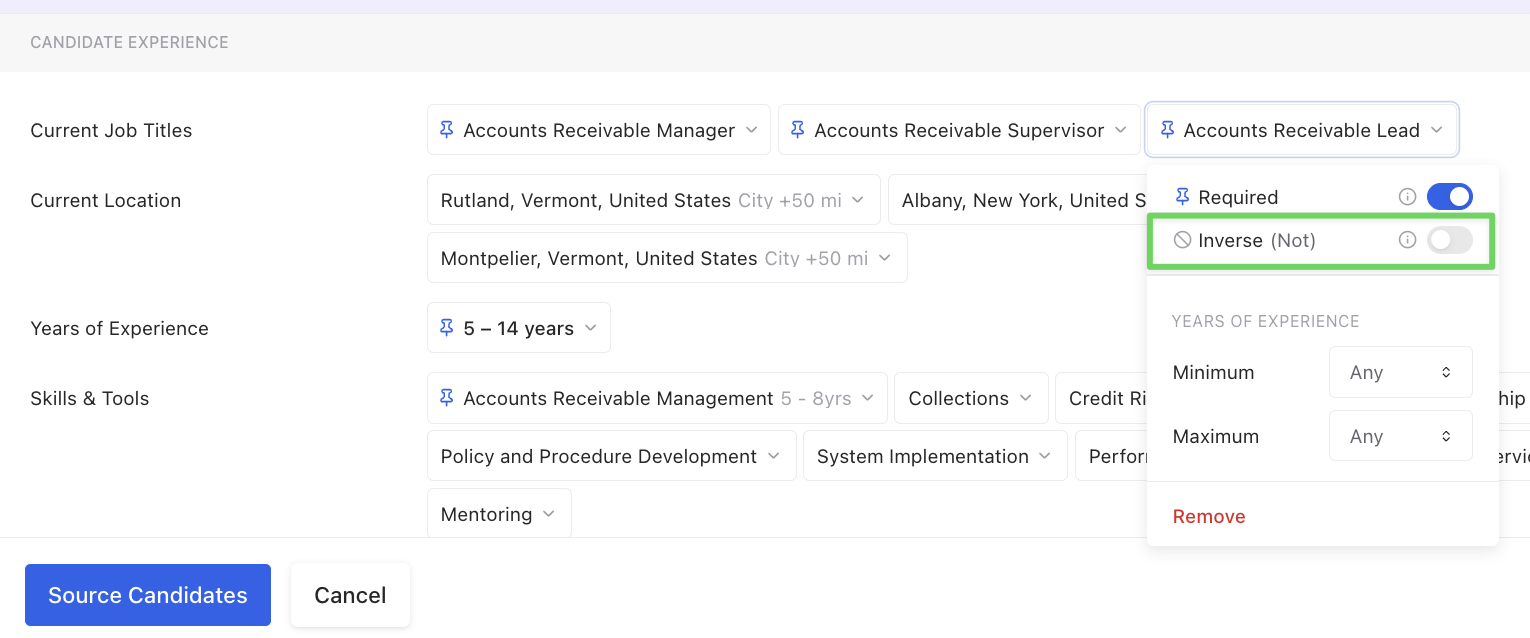
To exclude specific titles, industries, or companies from your results, add them to your search and toggle the "Inverse" (Not) option. For best results:
For job titles: Use exact strings (e.g., "Naturopathic Doctor") and set each to Inverse (Not).
For skills or keywords: Add each exclusion term separately (e.g., add "gender-affirming care" as one entry, "transgender" as another) and set each to Inverse (Not).
For industries or companies: Add automotive-related industries or specific company names and set them to Inverse when you're getting irrelevant results from certain sectors. For example, if you're searching for Manufacturing roles but want to exclude automotive companies, use this approach.
Multiple exclusions: Add each unwanted term as a separate filter entry rather than combining them.
When You Get Zero Results
If your search returns no candidates:
Verify your target location is supported: Pin's candidate search currently supports the United States, Canada, Europe, and Mexico only. Searches limited to other countries will return zero results.
Remove or make optional the most specific criteria first
Check industry names - use standard industry terms
Broaden location criteria if searching in a specific city or region
Add an ideal candidate profile by pasting a LinkedIn URL into the search criteria
System-Wide Issues
Occasionally, search issues may be due to temporary system problems. You can check our status page at status.pin.com for any ongoing issues.
If you continue experiencing problems after trying these solutions, please contact our support team with details about your specific search criteria.